
Introduction
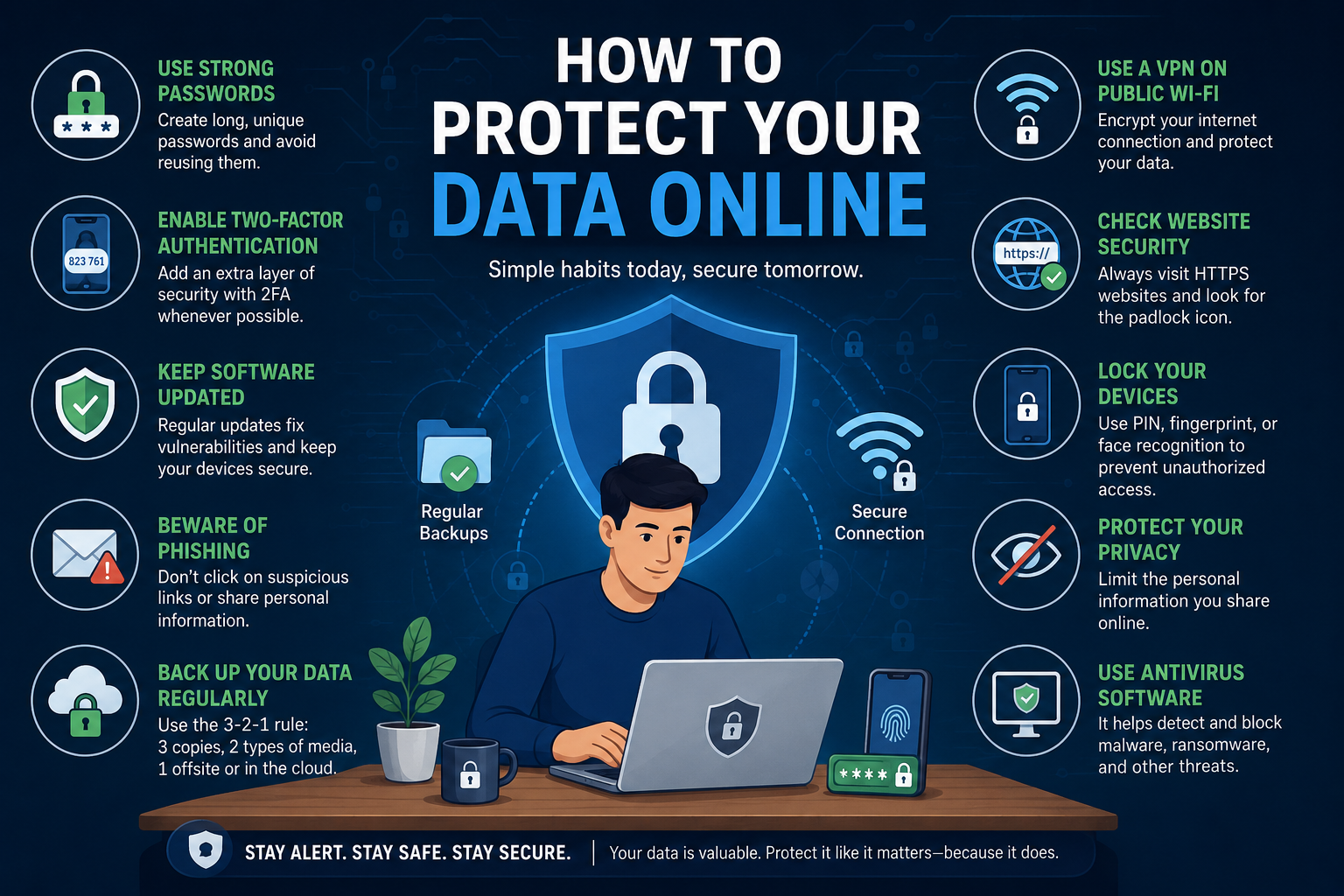
In today’s hyper-connected world, learning how to protect your data online is no longer optional—it is essential. Every time you browse the internet, shop online, use social media, or download an app, you leave behind valuable personal information. This data includes your passwords, banking details, emails, photos, and even your location history. Cybercriminals actively target this information because it can be used for identity theft, financial fraud, account takeovers, and other malicious activities.
The average internet user has dozens of online accounts spread across email providers, social networks, banking platforms, shopping websites, and cloud storage services. Each account contains sensitive data that could be exposed if proper security measures are not in place. Many people assume they are too insignificant to be targeted, but automated cyberattacks scan millions of devices every day looking for weak passwords, outdated software, and vulnerable users.
Understanding how to keep your personal information safe online is one of the most valuable digital skills you can develop. Whether you are a student, business owner, remote worker, parent, or casual internet user, protecting your data helps safeguard your finances, reputation, and privacy. A single compromised account can lead to unauthorized purchases, leaked private photos, stolen identities, and long-term emotional stress.
Why Online Data Protection Matters More Than Ever
The amount of personal information shared online has increased dramatically over the last decade. Cloud storage, digital payments, online banking, and smart devices have made life more convenient, but they have also created more opportunities for cyber threats.
Common risks include:
- Phishing attacks that trick you into revealing passwords
- Ransomware that locks your files until payment is made
- Spyware that secretly monitors your activity
- Data breaches exposing millions of accounts
- Public Wi-Fi attacks intercepting sensitive information
- Identity theft using stolen personal data
- Social engineering manipulating users into making mistakes
Cybercriminals no longer focus only on large corporations. Individuals are frequent targets because they often lack strong security practices.
What You Will Learn in This Guide
This comprehensive guide on how to protect your data online will walk you through every essential cybersecurity practice in simple and practical language.
You will learn:
- What online data protection means
- The most common threats to your personal information
- How to create strong passwords
- Why two-factor authentication is critical
- How to secure smartphones, laptops, and tablets
- Safe browsing and online shopping practices
- Tools such as VPNs, password managers, and antivirus software
- What to do if your data is stolen
- Long-term habits to maintain digital privacy
Quick Statistics About Online Security
| Cybersecurity Fact | Why It Matters |
|---|---|
| Billions of records are exposed in data breaches each year | Personal information is constantly at risk |
| Weak passwords remain one of the top causes of account compromise | Password hygiene is critical |
| Phishing is among the most common attack methods | Awareness can prevent most incidents |
| Public Wi-Fi networks are often unencrypted | Sensitive activities should be avoided on open networks |
Real-Life Example
Imagine receiving an email that appears to come from your bank asking you to verify your account. The message looks legitimate and includes official logos. You click the link and enter your username and password. Within minutes, cybercriminals use your credentials to access your account and initiate fraudulent transactions.
This scenario happens every day to people around the world. The good news is that simple precautions—such as checking URLs carefully, enabling two-factor authentication, and using a password manager—can prevent most attacks.
“Cybersecurity is not just a technical issue; it is a personal responsibility.”
The Core Principle of Online Privacy
Protecting your data online is about reducing risk. No security measure is perfect, but layering multiple protections significantly decreases the chances of becoming a victim.
Think of cybersecurity like home security:
- Strong passwords are your locks
- Two-factor authentication is your alarm system
- Antivirus software is your surveillance camera
- Backups are your insurance policy
- Awareness is your best defense
The more layers you add, the harder it becomes for attackers to succeed.
Key Takeaway
If you are wondering how to protect your data online, the answer starts with understanding the threats and adopting smart habits. Strong passwords, regular updates, secure connections, and cautious behavior can dramatically improve your digital safety.
What Does It Mean to Protect Your Data Online?
Understanding how to protect your data online begins with knowing exactly what “data” means and why it is so valuable. In simple terms, online data protection is the process of securing your personal and sensitive information from unauthorized access, theft, misuse, or destruction. This includes everything from your email password and bank account details to your photos, browsing history, and documents stored in the cloud.
Every time you use the internet, you generate data. When you log into a website, send an email, shop online, or install a mobile app, information about you is collected, transmitted, and often stored on servers around the world. Some of this data is necessary for services to function, but if it falls into the wrong hands, it can be used for fraud, identity theft, and surveillance.
Learning how to keep your personal information safe online means taking steps to control who can access your information and ensuring it remains confidential, accurate, and available when you need it.
Definition of Online Data Protection
Online data protection refers to the strategies, tools, and habits used to defend digital information from cyber threats. It combines three core cybersecurity principles:
1. Confidentiality
Only authorized people and systems should be able to access your information.
2. Integrity
Your data should remain accurate and should not be altered without permission.
3. Availability
Your information should remain accessible when you need it, even after device failure or cyberattacks.
These three principles are commonly known in cybersecurity as the CIA Triad.
| Principle | Meaning | Example |
|---|---|---|
| Confidentiality | Prevent unauthorized access | Encrypting files |
| Integrity | Prevent unauthorized changes | Detecting tampered documents |
| Availability | Ensure data remains accessible | Regular backups |
Types of Data You Should Protect Online
Many people think only financial information needs protection, but almost every category of personal data has value to cybercriminals.
Login Credentials
- Usernames and passwords
- Security questions
- Authentication codes
Personal Identification Information
- Full name
- Date of birth
- National ID or passport numbers
- Home address
- Phone numbers
Financial Information
- Bank account numbers
- Credit and debit card details
- Digital wallet accounts
Communication Data
- Emails
- Text messages
- Chat histories
Media Files
- Photos
- Videos
- Voice recordings
Health Records
- Medical reports
- Insurance details
- Prescription history
Professional and Academic Data
- Work documents
- Resumes
- Research files
- Student records
Browsing and Location Data
- Search history
- GPS location
- Device activity logs
Why Your Data Is Valuable to Cybercriminals
If you have ever wondered why hackers target ordinary people, the answer is simple: personal data is highly profitable.
Cybercriminals can use stolen data to:
- Open bank or credit accounts in your name
- Gain access to your email and social media
- Sell your information on dark web marketplaces
- Launch phishing attacks against your contacts
- Blackmail victims using private photos or messages
- Commit tax or insurance fraud
Even something as simple as your email address can be used to send targeted scams.
Examples of How Stolen Data Is Used
| Type of Data | Potential Misuse |
|---|---|
| Email account | Password resets for other accounts |
| Credit card information | Unauthorized purchases |
| Government ID | Identity theft |
| Personal photos | Extortion or blackmail |
| Phone number | SIM swapping attacks |
| Social media access | Spreading scams and malware |
The Difference Between Privacy and Security
Although often used interchangeably, privacy and security are different concepts.
Privacy
Privacy is about controlling who collects and uses your information.
Security
Security is about protecting that information from unauthorized access.
For example:
- Privacy settings on social media determine who can see your posts.
- Security measures such as strong passwords prevent others from accessing your account.
Both are essential when learning how to protect your data online.
Where Your Data Is Stored
Your information may be stored in multiple places, including:
- Smartphones and tablets
- Laptops and desktop computers
- Cloud services
- Email accounts
- Social media platforms
- Banking systems
- Mobile applications
- Smart home devices
Because your data exists in many locations, a complete protection strategy must cover all devices and accounts.
Common Ways Data Is Exposed
Your information can be compromised through:
- Weak or reused passwords
- Phishing scams
- Malware infections
- Lost or stolen devices
- Public Wi-Fi interception
- Misconfigured cloud storage
- Data breaches at companies you use
- Excessive app permissions
Often, attackers do not “hack” in a dramatic way. They exploit simple mistakes and known vulnerabilities.
Real-World Scenario
Suppose you use the same password for your email, shopping site, and social media account. If one website suffers a data breach, attackers may try the same password on your other accounts. This technique, known as credential stuffing, can quickly compromise multiple services.
This is why unique passwords and two-factor authentication are among the most important defenses.
The Shared Responsibility Model
Protecting your data online is a shared responsibility:
Companies Are Responsible For:
- Securing their servers
- Encrypting stored information
- Monitoring for breaches
Users Are Responsible For:
- Creating strong passwords
- Enabling two-factor authentication
- Avoiding suspicious links
- Updating software
- Backing up files
Even if a company invests heavily in security, a weak password on your account can still lead to compromise.
Key Signs Your Data Is at Risk
Watch for these warning signs:
- Unexpected password reset emails
- Login alerts from unknown devices
- Unrecognized charges
- Slower device performance
- Pop-up ads or redirects
- Friends receiving strange messages from your account
Early detection can significantly reduce the damage caused by cyber incidents.
Key Takeaway
To understand how to protect your data online, you must first recognize that your digital information includes far more than just passwords and credit card numbers. Emails, photos, documents, health records, and browsing activity all contain valuable details that deserve protection.
Online data protection is the ongoing practice of securing this information through strong passwords, secure devices, cautious browsing, and smart privacy habits. Once you understand what needs protection and why it matters, the next step is learning why safeguarding your data is more important than ever in today’s digital world.
Why Protecting Your Data Online Is Essential in 2026
In 2026, understanding how to protect your data online is more important than at any other time in history. Our personal and professional lives are deeply connected to digital platforms. We bank online, store family photos in the cloud, attend virtual meetings, use mobile payment apps, and rely on dozens of internet-connected devices every day. While these technologies offer tremendous convenience, they also create more opportunities for cybercriminals to access sensitive information.
The modern threat landscape has evolved far beyond simple computer viruses. Attackers now use artificial intelligence, automated phishing campaigns, credential stuffing bots, ransomware, and sophisticated social engineering tactics to target individuals and organizations. You do not need to be wealthy or famous to become a victim. Anyone with an email address, smartphone, or online account can be targeted.
Learning how to keep your personal information safe online is no longer just a technical skill—it is a fundamental life skill, similar to locking your home, protecting your wallet, or safeguarding important documents.
The Digital World Has Expanded Dramatically
Most people now use a wide range of digital services, including:
- Online banking and investment accounts
- E-commerce platforms
- Social media networks
- Cloud storage services
- Messaging apps
- Streaming platforms
- Remote work tools
- Smart home devices
- Telehealth services
- Educational platforms
Each service collects and stores data. The more accounts you use, the larger your digital footprint and the more places your information can be exposed.
Rising Cyber Threats in 2026
Cybercrime continues to grow because stolen data is highly profitable. Attackers can sell credentials, commit fraud, extort victims, and launch further attacks using compromised accounts.
Most Common Threats Today
- Phishing: Fake emails and websites designed to steal passwords
- Ransomware: Malware that encrypts files and demands payment
- Spyware: Software that secretly monitors activity
- Credential Stuffing: Automated login attempts using leaked passwords
- SIM Swapping: Taking control of your phone number
- Business Email Compromise: Fraudulent requests appearing to come from trusted contacts
- Data Breaches: Large-scale exposure of customer information
Real Consequences of Data Theft
When personal data is stolen, the impact can be severe and long-lasting.
Financial Damage
- Unauthorized purchases
- Drained bank accounts
- Fraudulent loans or credit cards
Identity Theft
- New accounts opened in your name
- Tax fraud
- Insurance fraud
Emotional Stress
- Anxiety and loss of trust
- Time spent restoring accounts
- Fear of future attacks
Reputation Damage
- Hijacked social media accounts
- Scam messages sent to contacts
- Leaked private information
Why Ordinary Users Are Frequent Targets
Many people believe hackers only target large companies or wealthy individuals. In reality, automated tools scan the internet for anyone with weak passwords, outdated software, or poor security habits.
Attackers often prefer ordinary users because:
- Security practices may be weaker
- Victims are less likely to detect attacks quickly
- Stolen accounts can be used to target others
- Even small amounts of money can be profitable at scale
If millions of users are targeted, even a small success rate can generate significant profits.
The Growth of AI-Powered Scams
Artificial intelligence has made scams more convincing. Attackers can generate realistic emails, chat messages, and voice recordings that imitate trusted people or organizations.
Examples include:
- Highly personalized phishing emails
- Fake customer support chats
- Voice cloning scams impersonating family members
- Automatically translated scams targeting global audiences
This makes awareness and verification more important than ever.
Data Breaches Are Increasing
Even if you follow good security practices, companies you use may experience breaches. Email providers, retailers, healthcare systems, and social networks all store valuable information that can be exposed.
Common data exposed in breaches:
- Email addresses
- Password hashes
- Phone numbers
- Home addresses
- Payment information
Because breaches are common, using unique passwords and enabling two-factor authentication are critical safeguards.
Public Wi-Fi and Mobile Risks
The widespread use of smartphones and public networks has introduced additional vulnerabilities.
Potential risks include:
- Intercepted traffic on unsecured Wi-Fi
- Malicious mobile apps
- Excessive app permissions
- Lost or stolen devices
Since mobile phones often contain banking apps, photos, and personal communications, securing them is essential.
The Cost of Ignoring Online Security
Failing to protect your data online can result in:
| Consequence | Potential Impact |
|---|---|
| Account compromise | Loss of email, social media, and cloud access |
| Financial fraud | Unauthorized charges and stolen funds |
| Identity theft | Long-term credit and legal issues |
| Data loss | Lost documents and irreplaceable photos |
| Extortion | Demands involving sensitive information |
| Business disruption | Lost productivity and revenue |
The time required to recover can range from days to months.
Cybersecurity Is a Daily Habit
Protecting your information is not a one-time task. Threats evolve constantly, and new accounts and devices are added regularly. Effective security depends on consistent habits, such as:
- Updating software promptly
- Reviewing account activity
- Backing up important files
- Being cautious with links and attachments
- Monitoring privacy settings
Small, routine actions can prevent major problems.
Case Study: One Weak Password, Multiple Compromises
A user reused the same password across email, shopping, and social media accounts. After one retailer experienced a data breach, attackers used the leaked password to access the user’s email account. They then reset passwords for other services and sent scam messages to contacts.
Had the user employed a unique password and two-factor authentication, the damage would likely have been prevented.
Why Data Protection Matters for Families and Businesses
Protecting your data online benefits more than just you.
Families
- Safeguard children’s information
- Protect shared photos and documents
- Prevent financial fraud
Students
- Secure academic work and educational accounts
- Protect scholarship and application information
Businesses
- Defend customer data
- Maintain trust
- Reduce legal and financial exposure
Key Takeaway
In 2026, learning how to protect your data online is essential because cyber threats are more advanced, more automated, and more widespread than ever before. Every online account, mobile app, and connected device represents both an opportunity and a potential risk.
By adopting strong passwords, two-factor authentication, software updates, secure browsing habits, and regular backups, you can dramatically reduce your chances of becoming a victim of cybercrime.
Common Online Threats That Put Your Data at Risk
To truly understand how to protect your data online, you need to know what you are defending against. Cybersecurity is much easier when you can recognize the tactics criminals use to steal information. Most online attacks are not random. They rely on predictable weaknesses such as reused passwords, outdated software, careless clicks, and unprotected devices.
The good news is that many cyber threats follow recognizable patterns. Once you know how they work, you can identify warning signs early and avoid becoming a victim.
Phishing Emails and Fake Websites
Phishing is one of the most common and successful forms of cybercrime. Attackers send emails, text messages, or social media messages that appear to come from trusted organizations such as banks, online stores, or technology companies.
These messages often create urgency:
- “Your account has been suspended.”
- “Verify your payment information immediately.”
- “Unusual login detected.”
- “Claim your refund now.”
When users click the provided link, they are taken to a fake website that looks authentic. Any information entered—such as usernames, passwords, and credit card numbers—is sent directly to the attacker.
How to Avoid Phishing
- Check the sender’s email address carefully
- Hover over links before clicking
- Look for spelling mistakes and unusual wording
- Visit websites manually instead of using email links
- Enable two-factor authentication
Malware and Viruses
Malware is malicious software designed to damage systems or steal data. Viruses are one type of malware, but the category also includes spyware, worms, trojans, and adware.
Malware can be installed through:
- Infected email attachments
- Pirated software downloads
- Malicious websites
- Fake browser extensions
- Compromised mobile apps
Once installed, malware may record keystrokes, steal files, monitor activity, or open backdoors for attackers.
Ransomware Attacks
Ransomware encrypts your files and demands payment to restore access. Victims may lose access to important documents, photos, and business records.
Attackers typically gain access through:
- Phishing emails
- Vulnerable software
- Remote desktop exposures
- Malicious downloads
The most effective defense is maintaining secure offline or cloud backups.
Spyware
Spyware secretly monitors your activity and collects information such as:
- Browsing history
- Passwords
- Screenshots
- Messages
- Financial data
Because spyware often runs quietly in the background, users may not notice it until suspicious activity occurs.
Weak and Reused Passwords
Using short or repeated passwords remains one of the biggest security risks.
Examples of poor password practices:
- Using “123456” or “password”
- Reusing one password across multiple accounts
- Storing passwords in plain text documents
If one website is breached, attackers can test the same credentials elsewhere.
Credential Stuffing
Credential stuffing is an automated attack in which stolen usernames and passwords are tried across many websites. Since many users reuse passwords, this technique is highly effective.
A single leaked password can lead to multiple account takeovers.
Public Wi-Fi Risks
Open Wi-Fi networks in airports, hotels, cafés, and public places may expose your data if traffic is not properly secured.
Risks include:
- Intercepted communications
- Fake hotspot networks
- Session hijacking
Using a VPN and avoiding sensitive transactions on public Wi-Fi greatly reduces risk.
Social Engineering
Social engineering exploits human psychology rather than technical vulnerabilities. Attackers manipulate people into revealing information or performing risky actions.
Common tactics:
- Pretending to be customer support
- Impersonating coworkers or relatives
- Creating urgency or fear
- Offering rewards or prizes
Awareness and verification are the best defenses.
Keyloggers
Keyloggers record everything typed on your keyboard, including passwords and credit card numbers. They may be installed as malware or, in rare cases, as physical devices.
Fake Apps and Browser Extensions
Some apps and extensions appear useful but are designed to collect data, inject advertisements, or steal credentials.
Warning signs:
- Excessive permissions
- Poor reviews
- Unknown developers
- Requests for unrelated access
Only install software from trusted sources.
Data Breaches
A data breach occurs when an organization exposes customer information through hacking, insider misuse, or security failures.
Even if you do nothing wrong, your information can still be compromised if a company you use is breached.
SIM Swapping
In a SIM swap attack, criminals convince a mobile carrier to transfer your phone number to a new SIM card. They can then intercept calls and authentication codes used for account recovery.
Man-in-the-Middle Attacks
In these attacks, a criminal intercepts communications between you and a website or application.
Possible consequences:
- Stolen login credentials
- Altered communications
- Captured payment information
Secure HTTPS connections and VPNs help reduce this risk.
Insider Threats
Not all threats come from anonymous hackers. Employees, contractors, or others with legitimate access may intentionally or accidentally expose sensitive data.
IoT and Smart Device Vulnerabilities
Internet-connected devices such as cameras, speakers, and smart home products often have weak default passwords and infrequent updates.
Compromised devices can be used to monitor activity or gain access to your network.
AI-Powered Scams
Attackers increasingly use artificial intelligence to create highly convincing messages, fake voices, and automated phishing campaigns.
These scams can be personalized and difficult to distinguish from legitimate communications.
Threat Comparison Table
| Threat | Primary Goal | Common Method |
|---|---|---|
| Phishing | Steal credentials | Fake emails and websites |
| Malware | Steal or damage data | Infected downloads |
| Ransomware | Extort payment | Encrypting files |
| Spyware | Monitor activity | Hidden software |
| Credential Stuffing | Account takeover | Reused passwords |
| SIM Swapping | Bypass authentication | Phone number hijacking |
| Data Breach | Expose stored data | Compromised organizations |
Key Takeaway
The first step in learning how to protect your data online is recognizing the most common threats. From phishing and malware to weak passwords and data breaches, cybercriminals rely on both technical vulnerabilities and human mistakes.
By understanding how these attacks work, you can adopt the right defenses and significantly reduce your exposure to online risks.
How to Protect Your Data Online: 20 Proven Security Tips
Now that you understand the most common cyber threats, it is time to focus on practical action. Learning how to protect your data online does not require advanced technical knowledge. In most cases, a small set of smart habits can prevent the majority of cyberattacks.
Security experts often recommend a layered approach. Instead of relying on a single tool, combine strong passwords, two-factor authentication, software updates, secure browsing, backups, and privacy controls. Each layer reduces the chance that one mistake will lead to a major compromise.
The following 20 proven cybersecurity practices form the foundation of effective digital protection.
1. Use Strong and Unique Passwords
Your password is the first line of defense for every online account. A strong password should be long, unpredictable, and different for each website.
Characteristics of a strong password:
- At least 14–16 characters
- Mix of words or a generated random string
- Unique for every account
- Not based on personal information
Good example:
BlueRiver!Cactus7Moon
Avoid:
123456password- Your name and birth year
2. Enable Two-Factor Authentication (2FA)
Two-factor authentication adds a second verification step after your password. Even if a password is stolen, attackers usually cannot access the account without the additional code or approval.
Common methods:
- Authenticator apps
- Hardware security keys
- Push notifications
2FA should be enabled on:
- Email accounts
- Banking services
- Cloud storage
- Social media
- Password managers
3. Use a Password Manager
A password manager securely stores and generates unique passwords for all your accounts.
Benefits include:
- Strong password generation
- Automatic form filling
- Secure syncing across devices
- Reduced password reuse
4. Keep Software and Apps Updated
Updates often contain critical security patches that fix known vulnerabilities.
Always update:
- Operating systems
- Web browsers
- Mobile apps
- Antivirus software
- Router firmware
Enable automatic updates whenever possible.
5. Install Reliable Antivirus and Anti-Malware Software
Security software can detect and block malicious files, suspicious websites, and unauthorized behavior.
It is especially useful for:
- Download-heavy users
- Shared computers
- Small businesses
6. Use a VPN on Public Wi-Fi
A Virtual Private Network (VPN) encrypts your internet traffic and helps protect your data when using open networks in cafés, airports, and hotels.
7. Avoid Clicking Suspicious Links
Treat unexpected emails, texts, and messages with caution.
Before clicking:
- Verify the sender
- Check the URL
- Look for urgency or threats
- Contact the organization directly if unsure
8. Verify Website URLs
Attackers often use domains that closely resemble legitimate websites.
Examples:
paypa1.cominstead ofpaypal.comarnazon.cominstead ofamazon.com
Always inspect the domain carefully.
9. Download Apps Only from Trusted Sources
Install apps from official stores and reputable developers. Avoid pirated software and unofficial APKs unless you fully trust the source and verify integrity.
10. Review App Permissions
Many apps request more access than they need.
Regularly review permissions for:
- Camera
- Microphone
- Contacts
- Location
- Files
Grant only what is necessary.
11. Limit Personal Information Shared Online
Oversharing on social media can help attackers guess passwords and security questions.
Avoid posting:
- Birth dates
- Addresses
- Travel plans
- Sensitive documents
12. Encrypt Your Devices
Full-disk encryption protects your files if a laptop or phone is lost or stolen.
Most modern operating systems include built-in encryption features.
13. Back Up Important Data Regularly
Backups protect against ransomware, hardware failure, and accidental deletion.
Follow the 3-2-1 rule:
- 3 copies of data
- 2 different storage media
- 1 copy offsite or in the cloud
14. Use Secure Cloud Storage
Choose reputable providers that support encryption, access controls, and account recovery protections.
15. Lock Devices with PIN, Fingerprint, or Face Recognition
Physical access can lead to complete compromise if devices are unlocked.
Use:
- Strong PINs
- Biometrics
- Automatic screen locking
16. Log Out of Shared Devices
Always sign out when using public or shared computers, and avoid saving passwords in browsers you do not control.
17. Monitor Financial and Account Activity
Review:
- Bank statements
- Credit card transactions
- Login alerts
- Security notifications
Early detection reduces losses.
18. Freeze Your Credit if Necessary
A credit freeze can prevent criminals from opening accounts in your name after identity theft.
19. Delete Unused Accounts
Inactive accounts increase your attack surface, especially if they contain old personal data or weak passwords.
20. Educate Family Members About Cyber Safety
One insecure device or account in a household can affect everyone.
Teach family members to:
- Recognize phishing attempts
- Use strong passwords
- Protect devices
- Report suspicious activity
Security Priority Table
| Security Measure | Difficulty | Protection Value |
|---|---|---|
| Strong unique passwords | Easy | Very High |
| Two-factor authentication | Easy | Very High |
| Password manager | Easy | Very High |
| Software updates | Easy | High |
| Backups | Moderate | Very High |
| VPN on public Wi-Fi | Easy | Moderate |
| Permission reviews | Easy | High |
Quick Start Checklist
If you want the fastest way to improve security today, start with these five steps:
- Change reused passwords
- Enable two-factor authentication
- Install a password manager
- Update all devices
- Back up important files
These actions alone dramatically reduce your risk.
Key Takeaway
The most effective answer to how to protect your data online is to combine multiple security practices into a consistent routine. Strong passwords, two-factor authentication, updates, cautious browsing, and backups work together to create powerful protection.
You do not need to implement everything at once. Start with the highest-impact steps, then gradually strengthen every account and device you use.
How to Create a Strong Password
When people ask how to protect your data online, one of the most important and practical answers is simple: create strong passwords. Passwords are the first barrier between your personal information and cybercriminals. If a password is weak, predictable, or reused across multiple websites, attackers can gain access to your email, banking accounts, cloud storage, and social media profiles in minutes.
Despite years of cybersecurity awareness, weak passwords remain one of the leading causes of account compromise. Many users still rely on common choices such as 123456, password, or their own names and birthdays. These passwords can be guessed almost instantly using automated tools that test millions of combinations per second.
The good news is that building secure passwords is straightforward once you understand the principles behind them.
Why Strong Passwords Matter
Your password protects some of your most valuable digital assets, including:
- Email accounts
- Online banking
- Shopping websites
- Work and school accounts
- Cloud storage
- Social media profiles
- Password managers
If an attacker gains access to your email account, they can often reset passwords for many other services. This makes email security especially critical.
Characteristics of a Strong Password
A secure password should be:
- Long (at least 14 to 16 characters)
- Unique for every account
- Random or unpredictable
- Not based on personal information
- Stored securely
The longer and more random a password is, the harder it is to crack.
Password Strength Concept
In simple terms, password security increases dramatically with length and randomness.
Security∝Length×Randomness
This is not a formal equation, but it illustrates the core idea: adding characters and unpredictability makes passwords exponentially stronger.
Examples of Strong and Weak Passwords
| Password Example | Strength | Reason |
|---|---|---|
123456 | Very Weak | Common and instantly guessed |
Ali1999 | Weak | Personal and predictable |
Summer2026! | Moderate | Better, but still guessable |
BlueRiver!Cactus7Moon | Strong | Long and unpredictable |
| Randomly generated 20-character password | Excellent | Highly resistant to guessing |
Passphrases: A Practical Approach
One of the easiest ways to create memorable and secure passwords is to use a passphrase—a combination of unrelated words, numbers, and symbols.
Examples:
Coffee!Planet7RiverTigerMoon$Garden42OceanCloud
Because these passphrases are long and unusual, they are much more secure than short, complex-looking passwords.
Why Password Reuse Is Dangerous
Reusing the same password across multiple accounts is one of the most serious security mistakes.
Imagine you use the same password for:
- Social media
- Online shopping
- Banking
If one website suffers a data breach, attackers can try the same credentials elsewhere. This automated technique is known as credential stuffing.
How Password Cracking Works
Attackers use specialized software to guess passwords through methods such as:
- Dictionary attacks
- Brute-force attacks
- Credential stuffing
- Password spraying
These tools can test huge numbers of passwords rapidly, which is why common or short passwords fail quickly.
The Best Way to Manage Passwords
Remembering dozens of unique passwords is difficult. A password manager solves this problem by securely storing credentials and generating strong passwords automatically.
Benefits include:
- Unique passwords for every site
- Secure encrypted storage
- Auto-fill functionality
- Synchronization across devices
With a password manager, you only need to remember one strong master password.
How to Create a Strong Password Step by Step
- Choose four or five unrelated words.
- Add numbers and symbols.
- Ensure the password is at least 14 characters long.
- Do not reuse it anywhere else.
- Store it in a trusted password manager.
Example transformation:
- Words: River, Apple, Falcon, Stone
- Final password:
River!Apple9FalconStone
Password Security Do’s and Don’ts
Do
- Use a unique password for every account
- Enable two-factor authentication
- Store passwords in a password manager
- Update compromised passwords immediately
Don’t
- Reuse passwords
- Share passwords over email or messaging apps
- Store passwords in unencrypted notes
- Use personal details such as birthdays
Accounts That Need the Strongest Passwords
Prioritize strong passwords for:
- Email accounts
- Banking and payment services
- Password managers
- Cloud storage
- Work and school accounts
- Social media accounts
These accounts can often be used to reset or access other services.
Real-World Example
A user reused the same password across multiple websites. After one small retailer experienced a breach, attackers used the exposed credentials to access the user’s email account. From there, they reset passwords for social media and shopping accounts, resulting in unauthorized purchases and account takeovers.
A unique password for each site would have prevented this chain reaction.
How Often Should You Change Passwords?
Modern security guidance generally recommends changing passwords when:
- A breach occurs
- You suspect compromise
- You shared the password insecurely
- The password is weak or reused
There is usually no need to change strong passwords frequently unless there is evidence of risk.
Key Takeaway
Creating strong passwords is one of the most effective steps in learning how to protect your data online. A secure password should be long, unique, and unpredictable. Combined with a password manager and two-factor authentication, strong passwords provide a powerful defense against unauthorized access.
By replacing reused or weak passwords today, you can dramatically improve the security of every account you own.
How Two-Factor Authentication Protects Your Data Online
If strong passwords are the locks on your digital doors, two-factor authentication (2FA) is the alarm system that protects those doors even when someone steals the key. When learning how to protect your data online, enabling 2FA is one of the most effective security steps you can take.
Millions of accounts are compromised each year because passwords are leaked in data breaches, guessed through brute-force attacks, or stolen through phishing. Two-factor authentication dramatically reduces this risk by requiring a second form of verification in addition to your password.
Even if a hacker knows your password, they usually cannot access your account without the second authentication factor.
What Is Two-Factor Authentication (2FA)?
Two-factor authentication is a security method that requires two separate forms of identification before granting access.
These factors generally fall into three categories:
- Something you know – Your password or PIN
- Something you have – Your phone, authenticator app, or security key
- Something you are – Fingerprint or facial recognition
Most online services combine your password with a one-time code generated by an authenticator app or sent to your device.
How 2FA Works
A simplified authentication flow looks like this:
Access=Password+Second Factor
The concept is straightforward: both elements are required to complete the login process.
Example of Two-Factor Authentication in Action
- You enter your username and password.
- The service asks for a six-digit verification code.
- You open an authenticator app and retrieve the current code.
- After entering the code, access is granted.
If an attacker steals your password but does not possess the second factor, the login attempt fails.
Why Two-Factor Authentication Is So Important
Passwords alone are vulnerable to:
- Data breaches
- Phishing attacks
- Keyloggers
- Credential stuffing
- Guessing attacks
2FA adds a critical barrier that prevents most automated account takeover attempts.
Benefits of 2FA
- Protects accounts even if passwords are exposed
- Blocks many phishing-based compromises
- Reduces identity theft risk
- Improves overall account security
Types of Two-Factor Authentication
Authenticator Apps
Applications generate time-based one-time passwords (TOTPs) that refresh every 30 seconds.
Push Notifications
A prompt is sent to your trusted device asking you to approve or deny the login.
Hardware Security Keys
Physical devices connected via USB, NFC, or Bluetooth provide very strong protection.
SMS Codes
Verification codes are sent by text message. Better than no 2FA, but less secure than authenticator apps or security keys.
Biometrics
Fingerprints and facial recognition may serve as an additional factor on some devices.
Which 2FA Method Is Best?
| Method | Security Level | Convenience |
|---|---|---|
| Hardware security keys | Excellent | Moderate |
| Authenticator apps | Very High | High |
| Push notifications | High | Very High |
| SMS codes | Moderate | Very High |
For most users, authenticator apps provide the best balance of security and ease of use.
Accounts That Should Always Use 2FA
Enable two-factor authentication on:
- Email accounts
- Banking and payment apps
- Cloud storage
- Password managers
- Social media
- Work and school accounts
- Developer accounts
- Cryptocurrency wallets
Email should be your highest priority because it can be used to reset many other passwords.
Authenticator Apps vs SMS Codes
Authenticator apps are generally more secure because codes are generated locally on your device and cannot be intercepted through SIM swapping as easily as text messages.
SMS-based authentication remains useful if no stronger option is available, but it should not be your first choice when better alternatives exist.
Backup Codes and Recovery Planning
When enabling 2FA, most services provide backup codes that can be used if you lose access to your device.
Best practices:
- Save backup codes in a secure location
- Store them offline if possible
- Update them if regenerated
Without backup codes, account recovery can be difficult.
Common Mistakes to Avoid
- Enabling 2FA without saving backup codes
- Using SMS when stronger options are available
- Ignoring suspicious approval requests
- Leaving critical accounts without 2FA
Real-World Example
A user’s password was exposed in a data breach and later used in automated login attempts. Because two-factor authentication was enabled, the attacker could not access the account. The user received an unexpected login prompt, changed the password, and avoided any data loss.
Without 2FA, the account would likely have been compromised.
How to Enable Two-Factor Authentication
- Open your account security settings.
- Select two-factor authentication or multi-factor authentication.
- Choose an authenticator app or security key.
- Scan the QR code or register the device.
- Save backup codes.
- Test the login process.
The entire process typically takes only a few minutes.
Key Takeaway
If you want to know how to protect your data online, enabling two-factor authentication is one of the most powerful actions you can take. It adds a second layer of defense that protects your accounts even when passwords are stolen.
Combined with strong, unique passwords and a password manager, 2FA significantly reduces the risk of unauthorized access and identity theft
How to Protect Your Data on Public Wi-Fi
Public Wi-Fi is convenient, but it is also one of the riskiest environments for your personal data. When you connect to free internet in cafés, airports, hotels, malls, or libraries, you are often sharing the same network with strangers. This makes it easier for attackers to intercept your activity if proper security is not in place.
If you are learning how to protect your data online, understanding public Wi-Fi risks is essential because many data theft incidents happen in these environments without users even realizing it.
Why Public Wi-Fi Is Risky
Most public Wi-Fi networks are either:
- Poorly encrypted
- Completely open (no password protection)
- Shared among many unknown users
This creates opportunities for attackers to:
- Monitor unencrypted traffic
- Steal login credentials
- Hijack active sessions
- Create fake Wi-Fi hotspots
Common attack methods on public Wi-Fi:
- Man-in-the-middle attacks
- Packet sniffing
- Rogue hotspot impersonation
- Session hijacking
What Happens When Your Data Is Intercepted
When you send data over an unsecured network, it may travel like a “postcard” instead of a sealed envelope. Anyone on the same network could potentially view:
- Websites you visit
- Login details (if not encrypted)
- Messages sent over unsecure apps
- Personal information entered into forms
This is why secure browsing and encryption matter so much.
Use a VPN (Virtual Private Network)
One of the most effective ways to protect your data on public Wi-Fi is by using a VPN (Virtual Private Network).
A VPN encrypts your internet traffic and routes it through a secure server, making it extremely difficult for attackers to see what you are doing online.
How a VPN protects you:
- Encrypts all data between your device and the internet
- Hides your IP address
- Prevents tracking on public networks
- Secures sensitive transactions
VPN protection model:
Datasecure=Dataencrypted+TunnelVPN
Turn Off Automatic Wi-Fi Connections
Many smartphones automatically connect to known or open networks. This can expose you to fake hotspots.
Best practice:
- Disable “auto-connect to Wi-Fi”
- Manually select trusted networks only
- Forget unused public networks after use
Avoid Sensitive Activities on Public Wi-Fi
Even with protection, it is best to avoid risky actions on open networks.
Avoid:
- Online banking
- Entering credit card details
- Logging into important accounts without VPN
- Downloading unknown files
Safer alternatives:
- Use mobile data for sensitive tasks
- Wait until you are on a trusted network
Beware of Fake Wi-Fi Networks (Evil Twin Attacks)
Attackers sometimes create fake networks that look legitimate.
Examples:
- “Free Airport WiFi”
- “Cafe Guest Network”
- “Hotel WiFi Secure”
Once connected, users unknowingly send all traffic through the attacker’s system.
How to stay safe:
- Confirm Wi-Fi name with staff
- Avoid networks without passwords
- Use VPN if unsure
Always Use HTTPS Websites
HTTPS encrypts data between your browser and websites.
How to check:
- Look for a padlock icon 🔒 in the browser
- Ensure URL starts with
https://
Avoid entering sensitive data on sites that use only HTTP.
Disable File Sharing and AirDrop (Public Settings)
When connected to public Wi-Fi:
- Turn off file sharing
- Disable AirDrop or nearby sharing
- Restrict device discoverability
This prevents strangers from accessing your device directly.
Keep Your Firewall Enabled
A firewall acts as a barrier between your device and external threats.
It helps:
- Block unauthorized access attempts
- Monitor incoming and outgoing traffic
- Reduce exposure on public networks
Use Mobile Data When Possible
Mobile data connections (4G/5G) are generally more secure than public Wi-Fi because traffic is encrypted by your mobile carrier.
Use mobile data for:
- Banking apps
- Password changes
- Sensitive logins
Real-World Example
A traveler connected to free airport Wi-Fi without a VPN. A hacker on the same network used a rogue hotspot to intercept unencrypted traffic. Within minutes, login credentials for email and social media were stolen, leading to account takeover attempts.
When the same user later switched to a VPN on public Wi-Fi, no further suspicious activity occurred.
Public Wi-Fi Safety Checklist
- Use a VPN whenever possible
- Avoid logging into sensitive accounts
- Turn off auto-connect
- Verify network names
- Use HTTPS websites only
- Disable file sharing
- Prefer mobile data for important tasks
Key Takeaway
Public Wi-Fi is one of the most common weak points in digital security. If you are serious about how to protect your data online, you must treat open networks as untrusted environments.
With simple precautions like using a VPN, avoiding sensitive transactions, and verifying networks, you can significantly reduce your risk and safely use public internet anywhere.
Frequently Asked Questions (FAQs) About How to Protect Your Data Online
Below are the most common questions people ask when trying to understand how to protect your data online. These answers are written in simple, practical language so you can apply them immediately.
1. What is the best way to protect your data online?
The best way to protect your data online is to combine multiple security practices instead of relying on just one.
The most important steps are:
- Use strong, unique passwords
- Enable two-factor authentication (2FA)
- Keep your devices and apps updated
- Avoid clicking suspicious links
- Use a password manager
- Regularly back up your data
Security works best in layers. Even if one layer fails, others still protect your information.
2. How can I protect my personal information on the internet?
To protect your personal information online:
- Share less personal data on social media
- Use privacy settings on all platforms
- Avoid filling unnecessary online forms
- Do not publish sensitive details like your address or ID numbers
- Use secure websites (HTTPS)
- Limit app permissions on your phone
A good rule is: only share what is absolutely necessary.
3. Is a VPN necessary for online safety?
A VPN is not mandatory, but it is very useful, especially on public Wi-Fi.
A VPN helps you:
- Encrypt your internet traffic
- Hide your IP address
- Protect data from hackers on shared networks
It is especially recommended when:
- Using public Wi-Fi
- Traveling
- Accessing sensitive accounts outside home networks
However, a VPN should be used alongside other security practices, not as the only protection.
4. What should I do after a data breach?
If your data is exposed in a breach, act quickly:
- Change your passwords immediately
- Enable two-factor authentication
- Check for suspicious account activity
- Update passwords on other accounts (if reused)
- Monitor bank statements
- Inform your bank if financial data is involved
Fast action reduces long-term damage significantly.
5. How often should I change my passwords?
You do not need to change passwords constantly if they are strong and unique.
You should change them when:
- A data breach occurs
- You suspect unauthorized access
- You reused the same password on multiple sites
- You shared the password insecurely
Otherwise, strong passwords combined with 2FA are more important than frequent changes.
6. Can antivirus software fully protect my data online?
No, antivirus software alone is not enough.
It helps protect against:
- Malware
- Viruses
- Some phishing attempts
But it cannot protect you from:
- Weak passwords
- Social engineering scams
- Data breaches
- User mistakes
You need a combination of tools and safe habits.
7. What is the safest way to store passwords?
The safest method is using a password manager.
It allows you to:
- Store passwords securely in encrypted form
- Generate strong passwords automatically
- Avoid reusing passwords
- Sync across devices safely
Avoid writing passwords in notebooks, notes apps, or browsers without protection.
8. How do hackers usually steal data online?
Hackers commonly use:
- Phishing emails and fake websites
- Weak or reused passwords
- Malware and spyware
- Data breaches
- Public Wi-Fi attacks
- Social engineering tricks
Most attacks succeed due to human error, not advanced hacking techniques.
9. Are mobile phones safe for online transactions?
Yes, but only if properly secured.
To stay safe:
- Use screen lock (PIN, fingerprint, or face ID)
- Keep apps updated
- Avoid unknown APK files
- Enable 2FA on banking apps
- Do not use public Wi-Fi without protection
A secure smartphone can be very safe for online transactions.
10. What is the most important rule for online safety?
The most important rule is:
Never trust unknown links, messages, or requests without verification.
Most cyberattacks start with human interaction—clicking a link, downloading a file, or sharing information.
Key Takeaway
Understanding how to protect your data online becomes much easier when you follow simple habits: strong passwords, two-factor authentication, cautious browsing, and awareness of common scams.
Most cyber threats can be prevented not with complex tools, but with consistent smart behavior.