
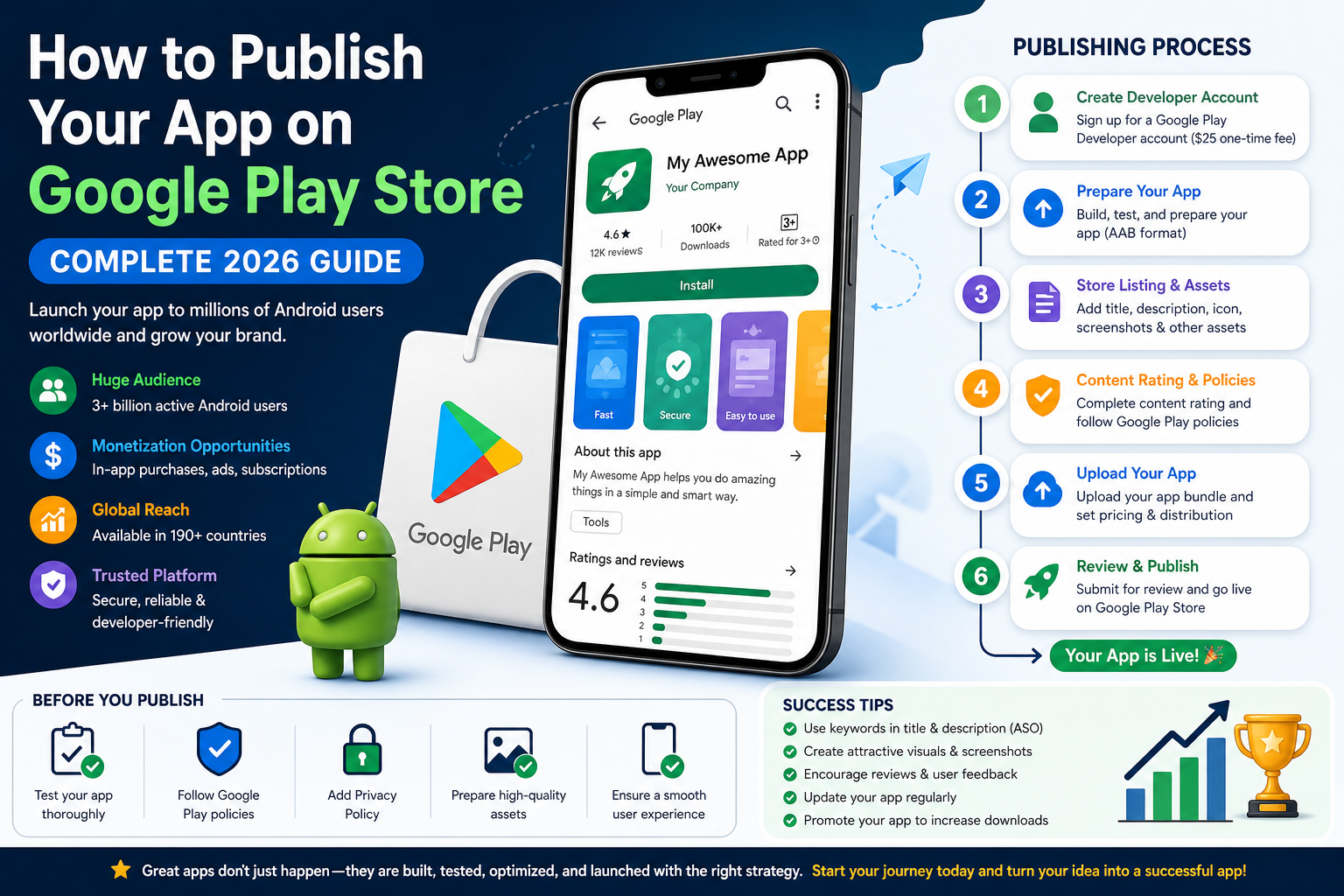
Introduction to Publishing Apps on Google Play Store
Publishing an app on the Google Play Store means making your mobile application available to millions of Android users worldwide. If you’re wondering how to publish your app on Google Play Store, you’re not alone. Every day, thousands of developers—from beginners to large companies—launch apps to reach a global audience and generate revenue.
The Google Play Store is the official app distribution platform for Android devices. It has over 3 billion active users, making it one of the largest digital marketplaces in the world. This massive reach is exactly why learning how to publish your app on Google Play Store can be a game-changer for developers, entrepreneurs, and businesses.
Why Choose Google Play Store for App Publishing?
There are many platforms where you can distribute apps, but Google Play stands out due to its accessibility and flexibility. Unlike some platforms, it allows almost anyone to become a publisher with minimal upfront cost.
Here are some key reasons why developers prefer Google Play:
- Global Reach: Your app can be downloaded in over 190+ countries
- Low Entry Cost: Only a one-time $25 fee to create a developer account
- Multiple Monetization Options: Ads, in-app purchases, subscriptions
- Easy Updates: You can update your app anytime after publishing
- Developer-Friendly Policies: More flexible compared to other platforms
Benefits of Publishing Your App on Google Play Store
When you understand how to publish your app on Google Play Store, you unlock several benefits that go beyond just app distribution:
| Benefit | Description |
|---|---|
| Visibility | Reach millions of potential users searching daily |
| Credibility | Being on Google Play increases trust |
| Revenue Opportunities | Earn through ads, paid apps, or subscriptions |
| Analytics Access | Track installs, engagement, and user behavior |
| Scalability | Grow from a small app to a global product |
Who Can Publish an App on Google Play Store?
One of the best things about Google Play is that anyone can publish an app. You don’t need to be a large company or expert developer.
You can publish an app if you are:
- A beginner learning app development
- A freelancer building apps for clients
- A startup founder launching a product
- A business owner expanding digitally
- Even a non-coder using no-code tools
What Makes This Guide Different?
Many tutorials explain how to publish your app on Google Play Store, but they often skip important details. This guide is designed to be:
- Beginner-friendly (step-by-step explanations)
- SEO-focused (help your app rank in Play Store search)
- Practical (real-world tips and mistakes to avoid)
By the end of this guide, you’ll not only know how to publish your app but also how to optimize it for success.
Quick Overview: Publishing Process
Before we dive deeper, here’s a simplified version of the process:
- Create a Google Play Developer Account
- Prepare your app files and assets
- Upload your app to Google Play Console
- Add store listing details (title, description, images)
- Set pricing and distribution
- Submit for review and approval
Important Fact
According to industry data, over 70% of apps fail due to poor optimization and lack of preparation, not because of bad ideas.
What You Need Before Publishing Your App on Google Play Store
Before you jump into the actual steps of how to publish your app on Google Play Store, it’s important to prepare everything in advance. Many apps get rejected or delayed simply because developers skip this stage. Proper preparation not only speeds up approval but also increases your chances of success after launch.
Think of this stage as building a strong foundation. If your basics are solid, the publishing process becomes smooth and hassle-free.
Google Play Developer Account
To publish an app, the first thing you need is a Google Play Developer Account. Without it, you cannot access the Google Play Console or upload your app.
Key Details:
- One-time registration fee: $25 (paid via Google account)
- Account type: Individual or Organization
- Verification required: Identity and basic details
Steps to Create an Account:
- Go to Google Play Console
- Sign in with your Google account
- Pay the one-time fee
- Fill in your developer profile
- Verify your identity
Pro Tip: Use a professional email and accurate details to avoid verification issues later.
Finalized and Tested App
One of the biggest mistakes beginners make when learning how to publish your app on Google Play Store is uploading an unfinished or buggy app. Google has strict quality standards, and poor apps often get rejected.
Why Testing Is Important:
- Prevent crashes and bugs
- Improve user experience
- Avoid negative reviews after launch
Types of Testing You Should Do:
- Manual Testing: Use the app yourself on different devices
- Beta Testing: Share with a small group of users
- Automated Testing: Use tools to detect bugs
Checklist Before Publishing:
- App runs smoothly without crashes
- All buttons and features work correctly
- No broken links or errors
- Fast loading speed
App Requirements and Google Play Policies
Understanding Google Play policies is crucial when learning how to publish your app on Google Play Store. Violating these rules can lead to rejection or even account suspension.
Important Policy Areas:
- Content Policy: No harmful, illegal, or misleading content
- User Data Policy: Must protect user privacy
- Permissions: Only request necessary permissions
- Ads Policy: No intrusive or deceptive ads
Privacy Policy Requirement:
If your app collects any user data (even email), you must:
- Add a privacy policy URL
- Clearly explain how data is used
Important: Apps without a privacy policy are one of the most common reasons for rejection.
Required Assets for Publishing Your App
To successfully publish your app, you need to prepare several assets. These are what users will see on your app listing, so they must be professional and optimized.
1. App Title (Name)
- Keep it short and clear
- Include your main keyword naturally
- Example: “Photo Editor – Easy Image Editing App”
2. App Description
- Short Description (80 characters): Quick summary
- Long Description (4000 characters): Detailed explanation
Tips:
- Use keywords like how to publish your app on Google Play Store naturally
- Highlight features and benefits
- Keep it easy to read
3. App Icon
- Size: 512 x 512 px
- High-quality and eye-catching
- Simple design works best
4. Screenshots
- Show real app features
- Use at least 4–8 screenshots
- Add captions to explain each feature
5. Feature Graphic
- Size: 1024 x 500 px
- Used for promotions on Play Store
- Should visually represent your app
6. Promo Video (Optional but Powerful)
- Hosted on YouTube
- Shows how your app works
- Increases conversions
Quick Summary Table: Required Assets
| Asset | Purpose |
|---|---|
| App Title | Helps users find your app |
| Description | Explains features and benefits |
| Icon | First impression of your app |
| Screenshots | Showcase functionality |
| Feature Graphic | Promotional banner |
| Video | Boosts engagement and installs |
Common Preparation Mistakes to Avoid
- Uploading an unfinished app
- Ignoring Google Play policies
- Using low-quality images
- Writing poor or keyword-stuffed descriptions
- Forgetting the privacy policy
How Long Does It Take to Publish an App on Google Play Store?
One of the most common questions developers ask when learning how to publish your app on Google Play Store is: “How long will it take for my app to go live?”
The answer depends on several factors, but in most cases, the process is relatively quick compared to other app platforms.
Typical App Review Time
After you submit your app, Google reviews it to ensure it meets all policies and quality standards.
Average Approval Time:
- 24 to 72 hours (most apps)
- Up to 5–7 days (for new developer accounts)
- Longer delays (if manual review is required)
Important: First-time publishers often experience slightly longer review times because their accounts are reviewed more carefully.
What Happens During the Review Process?
Google performs both automated and manual checks before approving your app.
Review Includes:
- Policy Compliance: Does your app follow Google Play rules?
- App Functionality: Does the app crash or have major bugs?
- Security Checks: Is user data safe?
- Content Verification: Is the content appropriate and accurate?
Factors That Affect Approval Time
Not all apps are approved at the same speed. Here are the main factors that can impact how fast your app gets published:
1. New vs Old Developer Account
- New accounts take longer due to stricter checks
- Older accounts with good history get faster approvals
2. App Complexity
- Simple apps (e.g., calculators) are approved faster
- Complex apps (e.g., social media, fintech) take longer
3. Policy Compliance
- Apps that fully follow guidelines are approved quickly
- Any violation can delay or reject your app
4. App Category
- Sensitive categories like:
- Finance
- Health
- Kids apps
require deeper review
Fast-Track Tips to Get Approved Quickly
If you want to speed up the process of how to publish your app on Google Play Store, follow these expert tips:
- Submit a fully tested app (no crashes)
- Add a clear privacy policy
- Avoid misleading titles or descriptions
- Use only necessary permissions
- Ensure all assets (images, icons) are high quality
Real Example (Case Study)
Let’s look at a simple scenario:
| App Type | Approval Time |
|---|---|
| Basic utility app | 24 hours |
| Gaming app | 2–3 days |
| Finance app | 5–7 days |
Insight: Apps with sensitive user data always take longer due to stricter security checks.
What If Your App Is Rejected?
Rejection is common, especially for beginners learning how to publish your app on Google Play Store.
What You Should Do:
- Check the rejection email carefully
- Identify the issue (policy, bug, missing info)
- Fix the problem
- Resubmit your app
Tip: Don’t panic—most apps get approved after minor fixes.
Cost of Publishing an App on Google Play Store
Another important factor to consider when learning how to publish your app on Google Play Store is the cost. The good news is that publishing on Google Play is relatively affordable compared to other platforms.
1. Google Play Developer Account Fee
This is the only mandatory cost required to publish your app.
- One-time fee: $25
- No annual renewal required
- Allows you to publish unlimited apps
Fact: Unlike some platforms, Google Play does not charge yearly fees for developers.
2. App Development Cost (Optional)
If you’re not building the app yourself, development can be the biggest expense.
Estimated Costs:
| App Type | Cost Range |
|---|---|
| Basic app | $100 – $1,000 |
| متوسط app | $1,000 – $10,000 |
| Advanced app | $10,000+ |
Note: Costs vary depending on features, design, and developer expertise.
3. Design and Assets Cost
Professional visuals can improve downloads significantly.
Possible Expenses:
- App icon design
- Screenshots and graphics
- Promo video creation
4. Marketing and Promotion Cost
Publishing your app is just the beginning. To get downloads, you need marketing.
Popular Marketing Methods:
- App Store Optimization (ASO)
- Social media promotion
- Paid ads (Google Ads, Facebook Ads)
- Influencer marketing
5. Maintenance and Updates
Apps require continuous updates and improvements.
Ongoing Costs Include:
- Bug fixes
- Feature updates
- Server hosting (if needed)
- Customer support
Total Cost Summary
| Category | Estimated Cost |
|---|---|
| Developer Account | $25 (one-time) |
| Development | $100 – $10,000+ |
| Design | $50 – $500 |
| Marketing | Optional (varies) |
| Maintenance | Ongoing |
Pro Tip for Beginners
If you’re just starting and learning how to publish your app on Google Play Store, you can:
- Use free app builders
- Design assets using free tools
- Focus on organic growth instead of paid ads
Expert Insight
“Publishing an app is inexpensive, but making it successful requires smart investment in quality and marketing.”
Common Mistakes to Avoid When Publishing Your App on Google Play Store
Even after learning how to publish your app on Google Play Store, many developers fail because of simple but critical mistakes. These errors can lead to app rejection, low downloads, or poor user ratings.
Avoiding these mistakes can significantly improve your chances of success.
1. Ignoring Google Play Policies
One of the biggest reasons apps get rejected is policy violations.
Common Issues:
- Missing privacy policy
- Misleading app description
- Using restricted content
- Requesting unnecessary permissions
Tip: Always review Google Play policies before submitting your app.
2. Poor App Description (No SEO Optimization)
Your app description plays a huge role in App Store Optimization (ASO). Many developers either ignore it or overload it with keywords.
Mistakes to Avoid:
- Keyword stuffing
- Writing vague or unclear descriptions
- Not explaining app benefits
Best Practice:
- Use keywords like how to publish your app on Google Play Store naturally
- Focus on benefits, not just features
- Keep it simple and readable
3. Low-Quality Visual Assets
Users decide within seconds whether to install your app. Poor visuals can hurt your downloads.
Common Problems:
- Blurry screenshots
- Unattractive app icon
- No feature explanations
Solution:
- Use high-resolution images
- Highlight key features visually
- Add short captions on screenshots
4. Not Testing the App Properly
A buggy app leads to negative reviews and uninstalls.
Issues Caused by Poor Testing:
- App crashes
- Slow performance
- Broken features
Fix:
- Test on multiple devices
- Use beta testers
- Fix all major bugs before publishing
5. Missing Privacy Policy
This is one of the most common mistakes for beginners learning how to publish your app on Google Play Store.
Why It Matters:
- Required by Google
- Builds user trust
- Protects you legally
6. Choosing the Wrong Category
Selecting the wrong category affects your app’s visibility.
Example:
- A fitness app listed under “Entertainment” will struggle to rank
Quick Mistakes Checklist
- Ignoring policies
- Poor description
- Low-quality images
- No testing
- Missing privacy policy
- Wrong category
How to Optimize Your App Listing for SEO (ASO Tips)
Publishing your app is only half the job. To get downloads, you must optimize it using App Store Optimization (ASO). This is similar to SEO but for app stores.
If you truly want to succeed with how to publish your app on Google Play Store, you must focus on ranking your app in search results.
Use Keywords Naturally
Keywords help users find your app.
How to Use Keywords:
- Include main keyword in title
- Add variations in description
- Use related keywords (LSI keywords)
Example Keywords:
- publish app on Google Play
- upload app to Play Store
- Android app publishing guide
Important: Avoid overusing keywords—it can harm rankings.
Optimize Title and Description
Your app title is one of the most important ranking factors.
Best Practices:
- Keep title under 30 characters
- Add main keyword naturally
- Make it clear and catchy
Description Tips:
- Use bullet points
- Highlight benefits
- Add call-to-action (CTA)
Improve Visual Assets
Visuals directly impact conversion rates.
What to Focus On:
- Eye-catching app icon
- Clear and informative screenshots
- Engaging promo video
Fact: Apps with high-quality visuals get 30–40% more installs.
Get More Reviews and Ratings
User feedback is a strong ranking factor.
How to Increase Reviews:
- Ask users politely داخل app
- Provide great user experience
- Respond to reviews
Increase App Downloads (Growth Strategy)
More downloads = better rankings.
Growth Tips:
- Share app on social media
- Use referral programs
- Collaborate with influencers
ASO Ranking Factors Table
| Factor | Impact on Ranking |
|---|---|
| App Title | High |
| Keywords in Description | Medium |
| Ratings & Reviews | High |
| Downloads | Very High |
| Visual Assets | Conversion Boost |
Mini Case Study
A developer improved their app downloads by 60% just by:
- Updating screenshots
- Improving description
- Adding better keywords
Expert Insight
“ASO is not a one-time task. It’s an ongoing process that can make or break your app’s success.”
What Happens After You Publish Your App on Google Play Store?
Once your app is approved, it becomes live on the Google Play Store—but this is not the end of the journey. In fact, this is where the real work begins. Understanding what happens after publishing is essential if you truly want success from learning how to publish your app on Google Play Store.
1. Your App Goes Live Globally
After approval:
- Your app becomes available in selected countries
- Users can search, download, and install it
- Your app starts appearing in Play Store search results
Tip: It may take a few hours for your app to fully appear in search results.H3: 2. Monitor App Performance
Tracking performance helps you understand how users interact with your app.
Key Metrics to Track:
- Number of downloads
- Active users
- Retention rate
- Crash reports
- User engagement
Tools You Can Use:
- Google Play Console analytics
- Firebase Analytics
3. Handle User Reviews and Feedback
User reviews are critical for growth and ranking.
What You Should Do:
- Respond to both positive and negative reviews
- Fix issues mentioned by users
- Thank users for feedback
Fact: Apps with active developer responses build more trust and get better ratings.
4. Regularly Update Your App
Updating your app is essential for long-term success.
Why Updates Matter:
- Fix bugs and improve performance
- Add new features
- Keep users engaged
- Improve rankings
How to Update Your App on Google Play Store
Updating is a key part of maintaining your app after learning how to publish your app on Google Play Store.
Step-by-Step Update Process
- Go to Google Play Console
- Select your app
- Navigate to Release > Production
- Click Create new release
- Upload updated AAB/APK file
- Add release notes (what’s new)
- Submit for review
Best Practices for Updates
- Update your app regularly (every 2–4 weeks)
- Clearly explain changes in release notes
- Fix user-reported issues quickly
- Avoid making unnecessary changes
Example Release Notes
- Fixed app crashes
- Improved speed and performance
- Added new features
- Updated UI design
FAQs About How to Publish Your App on Google Play Store
Here are the most common questions beginners ask:
H3: Can I publish an app for free on Google Play Store?
No, you need to pay a one-time $25 fee to create a developer account. After that, you can publish unlimited apps.
Do I need coding skills to publish an app?
Not necessarily. You can use:
- No-code app builders
- Hire developers
- Use templates
How many apps can I publish with one account?
You can publish unlimited apps with a single developer account.
What file format is required?
Google recommends AAB (Android App Bundle) instead of APK.
Why was my app rejected?
Common reasons include:
- Policy violations
- Missing privacy policy
- App crashes
- Misleading content
Can I edit my app after publishing?
Yes, you can update:
- Description
- Images
- App features
- Entire app via updates
Final Thoughts on How to Publish Your App on Google Play Store
By now, you have a complete understanding of how to publish your app on Google Play Store—from preparation to launch and beyond.
Quick Recap
- Create a developer account
- Prepare your app and assets
- Upload your app to Play Console
- Optimize your listing (ASO)
- Submit for review
- Monitor and update regularly
Final Tips for Success
- Focus on user experience
- Keep improving your app
- Listen to user feedback
- Invest in ASO and marketing
Final Expert Quote:
“Publishing your app is just the beginning. Continuous improvement and smart optimization are what turn an app into a success.”
Conclusion
Learning how to publish your app on Google Play Store is one of the most valuable skills in today’s digital world. Whether you’re a beginner or an experienced developer, the opportunity to reach millions of users is огромный.
Start small, stay consistent, and keep improving—and your app can become your next big success